The Web Developer Roadmap for 2026
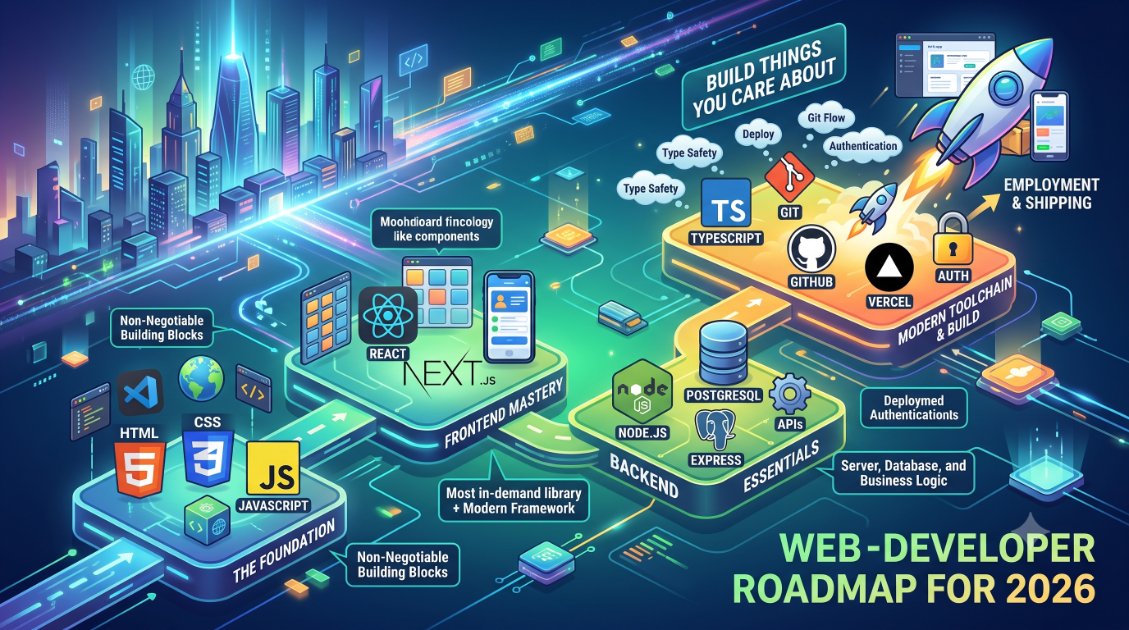
With hundreds of frameworks and tools competing for your attention, knowing where to start in web development is genuinely hard. This roadmap cuts through the noise and gives you a clear, honest path.

The Web Developer Roadmap for 2026
The web development landscape in 2026 is both exciting and overwhelming. There are more tools, frameworks, and learning paths than ever — and everyone on the internet has a hot take on the "right" stack.
This roadmap is opinionated, practical, and focused on getting you employed or shipping products — not on covering every possible option.
The Big Picture: What Web Development Actually Is
Web development splits into three broad areas:
Frontend — what users see and interact with. HTML, CSS, JavaScript, React.
Backend — the server, database, and business logic. Node.js, Python, databases, APIs.
Full-stack — both. Most jobs and products require both.
The roadmap below is roughly full-stack, because that's what the market demands and what gives you the most options.
Stage 1: The Non-Negotiable Foundation
Before any framework, before React, before Node — you must understand the web's building blocks.
HTML (1–2 weeks)
Learn semantic HTML. Understand the document structure, common tags, forms, and accessibility basics. HTML is not where beginners struggle — but skipping it creates gaps you'll feel later.
CSS (3–4 weeks)
CSS has a reputation for being frustrating. That reputation is earned. Learn:
- The box model
- Flexbox (essential for layouts)
- Grid (essential for complex layouts)
- Responsive design and media queries
- Custom properties (CSS variables)
Don't try to memorise CSS. Learn where to look things up, and build things. Clone a real webpage — a landing page, a blog layout — and you'll learn more in a day than a week of reading.
JavaScript (6–8 weeks)
This is where you'll spend the most time, and rightly so. Learn:
- Variables, types, functions, loops
- The DOM — selecting elements, handling events
- Fetch API and async/await
- ES6+ features: arrow functions, destructuring, spread, modules
- How the event loop works (you don't need to master it, but understand the basics)
JavaScript is the only language that runs natively in browsers. Everything else — TypeScript, JSX, Webpack — compiles down to it. Understand JavaScript before layering anything on top.
Stage 2: React (6–8 weeks)
React is not the only frontend framework, but it is the most in-demand. It's worth learning first.
Core React concepts:
- Components and JSX
- Props and state
- useEffect, useState, useContext
- Lifting state up
- React Router for navigation
Build 3–4 projects with plain React before touching Next.js. A to-do app is fine for learning, but interview the real world: a movie search app using a public API, a personal portfolio, a simple e-commerce UI.
Then: Next.js
Next.js is React with server-side rendering, file-based routing, and API routes built in. It's the dominant production framework for React apps in 2026. Once you're comfortable with React, Next.js feels natural.
Stage 3: Backend Basics (4–6 weeks)
Node.js and Express
Learn how HTTP works — requests, responses, status codes, headers. Build a simple REST API with Express: routes, middleware, request body parsing.
Databases
Learn SQL. Specifically, learn:
- SELECT, INSERT, UPDATE, DELETE
- JOINs
- Indexing basics
Use PostgreSQL. It's the industry standard relational database and what most serious projects use. Tools like Prisma make working with it in JavaScript/TypeScript much more pleasant.
Authentication
Understand sessions vs. tokens. Learn how JWTs work conceptually. Use an auth library (NextAuth, Clerk, or Auth.js) in a project before trying to implement auth from scratch.
Stage 4: The Modern Toolchain
By now you're building real things. Understand these tools:
- TypeScript — you should be using this by now. Type safety catches bugs before they reach users.
- Git and GitHub — not optional. Learn branching, pull requests, and merge conflicts.
- Vercel or Railway — deploy your projects. Something running on a real URL is worth 10 local demos.
- Environment variables — understand .env files, why secrets don't go in code.
What to Build
The portfolio matters more than certifications. Build three things:
- A full-stack app with auth — users can sign up, log in, and do something that persists in a database
- Something that solves a real problem — even a small one. Scratch your own itch.
- An API integration project — use a public API (weather, finance, sports) and build something interesting with it
Put all three on GitHub with READMEs. Deploy all three. These are what you show in interviews.
The Timeline (Realistic)
- 3 months: Comfortable with HTML, CSS, JS. Can build static pages.
- 6 months: Building React apps, understanding state management.
- 9–12 months: Full-stack projects deployed. Ready for junior roles.
- 18–24 months: Confident with the full toolchain. Mid-level territory.
The Most Important Advice
Build things you care about. Learning web development purely for the job is harder than learning it to build something you actually want to exist. The motivation to push through bugs and confusion is much stronger when you have a real goal.
The fundamentals are unglamorous — HTML, CSS, JavaScript — but they're what separates developers who can adapt to any framework from those who only know one. Invest in them.
The stack in this roadmap will be relevant for the next 5–7 years at minimum. Start with foundations. Build consistently. Ship things.
Comments
No comments yet. Be the first to share your thoughts.
Leave a comment
Learn this live, with Prasant
Articles give you a foundation. Live classes give you mastery — where you can ask questions, get real feedback, and build projects.
Browse Courses →